NATIONS
Nations bind towns into a political bloc, fight wars, and forge alliances. Everything is done by writing signed books and placing them on lecterns. The guide below covers forming a nation, integrating Independent Towns, and waging war, with a full book reference at the bottom.
What is a Nation?
A nation is a political collection of towns under a single leader. Nations can wage war, broker peace, form alliances, and pursue the path to becoming the Empire of Blothera.
Nations are made of towns. Citizens of any town in a nation are automatically citizens of the nation. You can be a citizen of multiple towns within one nation, but you cannot be a citizen of more than one nation at a time.
If you only want land and protection without political commitments, you might want an Independent Town instead.
A nation is a collection of towns under a single political leader.
Citizens of any town in a nation are automatically citizens of the nation. You cannot be a citizen of more than one nation.
Towns hold the citizens and land claims. Players join towns individually, not nations. Becoming a citizen of any town in a nation automatically makes you a citizen of that nation, but it does not enroll you in any of its other towns.
Any nation member can found a town. A player can lead one town but be a citizen of several towns within the same nation.
War, peace, and alliances are how nations interact. All three are conducted through the Diplomacy Lectern.
Only the nation leader can act on the nation's behalf.
Lectern Types
There are three custom lecterns, each handling a different scope of action. Place the right book in the right lectern.
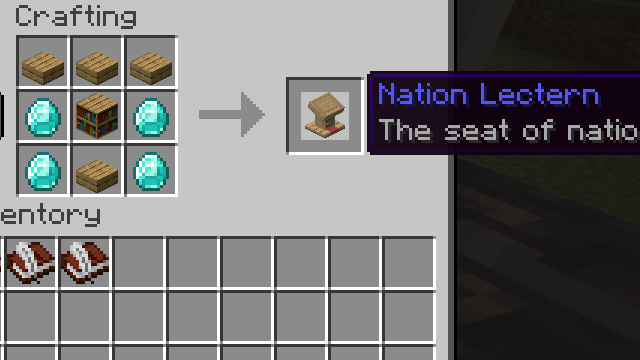
Nation-wide actions: forming, renaming, and managing nation leadership.
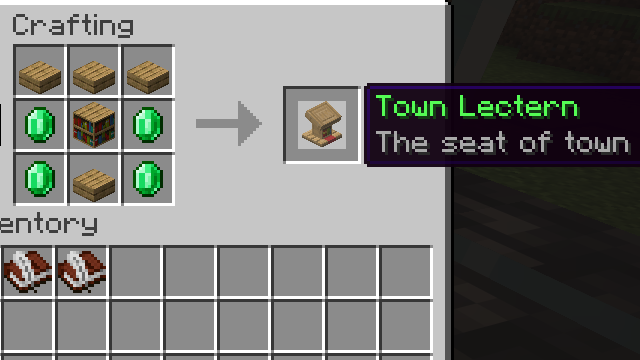
Town specific actions: forming, info, joining, tax, expansion, and kicks. Used by both Independent Towns and nation towns.
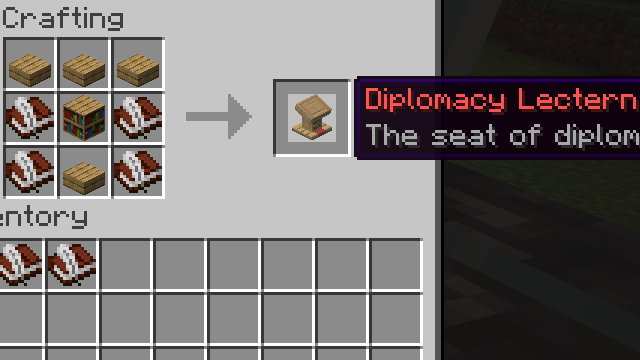
Inter-nation relations: war, peace, alliances, integration, and scheduling battles.
To form a Nation
Nations now form around an existing town. Lead an Independent Town first; that town will become the capital of your new nation.
- 1Lead an Independent Town. Found one first if you don't already.
- 2Obtain a Crown by either:
- Trading with another player.
- Obtaining a Dragon Egg from the End and giving it to Burri at spawn.
- 3Wearing the Crown, place a Nation Lectern within your town.
- 4Place a Diplomacy Lectern within 1 chunk of the Nation Lectern.
- 5Sign a book titled
form nationand place it on the Nation Lectern.
Your Independent Town becomes the capital. From there, additional towns can be founded under your banner.
NOTE: Crowns can also be traded between players. If you have a Crown but missed the quest, place a help book into each of the three lectern types to receive the help books.
Integrate Independent Towns
Nations can grow by absorbing Independent Towns through the integrate book. Integration is consensual: the target town reviews the offer and chooses whether to accept.
- 1Sign a book titled
integratewith the target town's name on the first line. - 2Place it in your Diplomacy Lectern. Take the resulting sealed delivery book.
- 3Place the delivery book in the target town's Town Lectern. The lectern must be inside that town's borders.
- 4The Independent Town reviews the request via the
requestsbook in their Town Lectern. - 5If accepted, the town joins your nation, adopts your map colour, and gains full access to nation-level mechanics.
You must be the nation leader. Vassalisation is not available for Independent Towns; integration is a one-way merge.
Book Types
Every book in the system falls into one of three categories. The category determines what happens when you place it on a lectern.
Update automatically when placed on, or read from, a lectern. The same book stays in the lectern.
e.g. requests · info · who am i · help
EXAMPLE
- 1.Sign a book titled
who am iand place it on any custom lectern. - 2.The lectern returns a personal ID book listing your nation and town membership.
- 3.Opening this book on a custom lectern automatically refreshes the data.
Instantly execute a command if your requirements are met.
e.g. form nation · form town · join · pay tax
EXAMPLE
- 1.Place emeralds in the chest beside your town lectern.
- 2.Sign a book titled
pay taxand place it on the town lectern. - 3.Tax is paid and the deadline extends.
- 4.You typically get back a receipt book confirming the action, useful for archiving history.
Place on a lectern to receive a sealed delivery book; carry that book to the target nation or town and place it there.
e.g. declare war · request alliance · integrate · move capital
EXAMPLE
- 1.Write
declare warwith the target nation's name in the body. - 2.Place it in your diplomacy lectern; take the sealed delivery book.
- 3.Place the delivery book in the target nation's diplomacy lectern.
Dynamic Power Transfer
The system is dynamic and persistent. It handles unexpected situations automatically:
- Disbanding the only town in a nation (via dormancy or command book) disbands the entire nation.
- If the nation leader is removed from all towns, leadership passes to the leader of the largest remaining town.
- Nation and town members are automatically exiled from all towns if they become a bandit.
- If the capital town is disbanded, capital status transfers to the largest remaining town.
War
War is the formal way nations resolve conflict on Blothera. Diplomacy, and so war, is the responsibility of the nation leader. Independent Towns cannot wage war.
A war is a best-of-three series of battles fought in arenas chosen by the system, near the defender's capital. Each battle is a 15-minute PvP fight; most kills wins. The first nation to win two battles wins the war.
Wars are now wars of vassalization. If the attacker wins, the defender becomes the attacker's vassal. Any other outcome (defender wins or a draw) leaves both nations sovereign.
Wars and battles are managed entirely through books and diplomacy lecterns.
Declare War
- 1You must be the leader of your nation.
- 2Get a book and quill, write the target nation's name on the first line.
- 3Sign the book with title
declare warorwar. - 4Place it in your diplomacy lectern, take the resulting delivery book, and place it in the target nation's diplomacy lectern.
- 5The declaration broadcasts to the server, and the first battle is queued.
Scheduling Battles
- Once war is declared, the system finds an arena chunk near the defender's capital and waits for a date and time to be picked.
- The defender picks for battles 1 and 3. The attacker picks for battle 2. The picker uses the diplomacy
infobook at their diplomacy lectern. - If the picker doesn't schedule within 48 hours, the system auto-schedules.
- Once scheduled, every member of both nations and their allies is notified, with countdown updates leading to the start.
Battle Compass
- Once a battle is scheduled, nation leaders on both sides can claim a Battle Compass.
- Sign a book titled
compassand place it in the diplomacy lectern. - The compass points to the arena so your nation and allies can rally.
- Only attacker and defender leaders can get one. Allies cannot. One per battle per nation. Don't lose it.
The Battle
- Battles last 15 minutes.
- The arena is a fixed chunk radius. A boss bar tracks kills for each side, and particles mark the borders.
- Most kills wins. Tied kills means a draw, with no point awarded.
- If only one side shows up, they win by default.
Arena Rules
- Combatants who leave the arena mid-battle count as a kill for the enemy. Hold the line.
- Bystanders may freely enter and leave, but PvP has no penalties inside, so they can kill or be killed.
- Players in the arena are temporarily flagged as aggressors (see Bandit rules) for the duration of the battle.
Allies
- Additional nations can join an existing war on either side.
- Sign a book titled
request join warand follow the standard delivery flow to the relevant diplomacy lectern. - Allies fight alongside their chosen side but cannot get a battle compass or schedule battles.
- You must already be allied with the nation to request to join their war. Alliances are formed by signing a
request allybook and delivering it to the other nation's diplomacy lectern. - Vassal nations automatically join their suzerain's wars on the same side and do not need to send a join request.
Peace
- Either nation can sign a
request peacebook and deliver it to the other nation's diplomacy lectern. - Like all diplomacy requests, this can be reviewed in the
requestsbook in a diplomacy lectern. - If accepted, the war ends immediately with no winner declared.
- If rejected or ignored, the war continues until a side wins the best-of-three.
Ending a War
- After the third battle, the war resolves automatically.
- The nation with the most battle wins is declared victorious. Equal wins means a draw.
- If the attacker wins, the defender becomes their vassal. If the defender wins or the war ends in a draw, both nations stay sovereign.
- The winning nation leader receives 200 emeralds; battle winners receive 20 emeralds per battle.
- The result is broadcast to the server.
- If a nation in the war is disbanded mid-war, the war is cleanly cancelled and allies are notified.
Vassalage
A vassal nation is bound to a suzerain. Vassals retain their towns, members, and internal autonomy, but their foreign policy answers to their overlord. Block claims of a vassal nation contribute fully towards the suzerain's empire status.
- Vassals cannot declare their own wars or form their own alliances.
- Vassals auto-join their suzerain's wars on the same side.
- Vassals render in their suzerain's map colour on the in-game map.
- A nation may serve only one suzerain, and vassals cannot themselves take vassals (no sub-vassal chains).
Offering Vassalage
- Sign a book titled
vassaloroffer vassalwith the target nation's name on the first line. - Place it in your Diplomacy Lectern, take the resulting delivery book, and deliver it to the target's Diplomacy Lectern.
- The target reviews the offer in their
requestsbook and chooses to accept or deny. - Both nations must have a clean slate: no alliances, no wars, no pending requests. Any existing vassals of either side are released to sovereign when the agreement takes effect.
Petitioning for Vassalage
- Sign a book titled
submit vassalorpetition vassalwith the prospective suzerain's name on the first line. - Place it in your Diplomacy Lectern, take the resulting delivery book, and deliver it to their Diplomacy Lectern.
- Same clean-slate requirement applies to both sides, and the target must itself be a sovereign nation.
Releasing a Vassal
- A suzerain may release a vassal at any time. The vassal returns to sovereignty and regains the right to conduct independent diplomacy.
- Sign a book titled
free vassalorrelease vassalwith the vassal's name on the first line. - Place it in your Diplomacy Lectern, take the resulting delivery book, and deliver it to the vassal's Diplomacy Lectern.
Declaring Independence
Vassals can rebel against their suzerain by declaring independence. A rebellion is a war fought 1v1 between the rebel and the suzerain. Co-vassals stay neutral and do not auto-join either side.
- Sign a book titled
independence. The body is optional; the suzerain is inferred automatically. - Place it in your Diplomacy Lectern, take the resulting delivery book, and deliver it to your suzerain's Diplomacy Lectern.
- You are provisionally sovereign for the duration of the war. Third parties can ally with you.
- If you win or draw the war, you stay sovereign and any new alliances forged during the rebellion stick.
- If your suzerain wins, you become their vassal again and all rebellion-era ties are wiped clean.
More Information
Looking for how towns work? See the Towns guide for founding, joining, tax, and expansion.
The canonical guide for nations and war lives in the in-game help books. Sign a book titled help and place it in any custom lectern. The type of help book you receive depends on the lectern.
This works in any area, claimed or unclaimed, in any lectern, by any player.
Insert a who am i or me book into any lectern to receive a personal identification book displaying your nation and town membership.
BOOK REFERENCE
Every book the plugin recognises. Searchable and filterable by lectern.
COMMAND
16Books that perform an action immediately when placed.
also: War Compass / Compass
Gives the nation leader a compass pointing to the next scheduled battle arena.
also: Dissolve Town
Permanently dissolves the town and releases its claims.
also: Kick Town
Removes a player from the town.
also: Expand
Starts a 5-minute expansion session that grows the town's borders organically.
also: Found Nation / Make Nation / Create Nation
Establishes a new nation with the player as its leader; the host town becomes the nation's capital.
also: Found Town / Make Town / Create Town
Founds a new town with a small disk of claimed land around the lectern. Nationless players found an Independent Town; nation members found a town under their nation's banner.
also: Join Town
Requests membership in the town (the leader must accept).
Renounces citizenship of your nation.
Renounces citizenship of the town.
also: Tax
Pays 5 emeralds to extend the town's tax deadline by 7 days and prevent dormancy.
also: Rename
Renames your nation.
also: Rename
Renames the town.
also: Color
Sets the banner colour shown for the nation on the map.
Transfers town leadership to another player.
Transfers nation leadership to another player.
also: Stop Join / Cancel Join
Cancels a pending join request.
DELIVERY
11Books that produce a sealed letter you carry to another lectern.
also: Integrate Town
Creates a sealed letter; placing it in the target Independent Town's Town Lectern proposes integration into your nation.
Creates a sealed letter; placing it in the target's Diplomacy Lectern dissolves the alliance.
also: War
Creates a sealed letter; placing it in the target's Diplomacy Lectern declares war.
also: Alliance / Ally / Offer Ally
Creates a sealed letter; placing it in the target's Diplomacy Lectern proposes an alliance.
also: Peace / Offer Peace
Creates a sealed letter; placing it in the target's Diplomacy Lectern proposes peace.
Creates a sealed letter; placing it in the ally's Diplomacy Lectern asks to join their active war.
also: Move Capital / Change Capital
Creates a sealed letter; placing it in the target town's Town Lectern makes that town the new capital.
also: Vassal
Creates a sealed letter; placing it in the target's Diplomacy Lectern offers to take them as your vassal.
also: Submit Vassal
Creates a sealed letter; placing it in the target's Diplomacy Lectern petitions to become their vassal.
also: Free Vassal
Creates a sealed letter; placing it in the vassal's Diplomacy Lectern releases them from vassalage and restores their sovereignty.
also: Declare Independence
Creates a sealed letter; placing it in your suzerain's Diplomacy Lectern declares a war of independence (rebellion). The suzerain is inferred automatically.
INFO
9Books that display information when read or placed.
also: Help Diplomacy / Help
Prints a guide to alliances, war, peace, and battle scheduling.
also: Info
Shows current relations, war status, scheduled battles, and (for defenders) the battle-time picker.
also: Requests
Lists pending diplomacy requests (alliance / peace / join-war) with clickable Accept and Deny buttons.
also: Who Am I / Whoami / Me
Shows your name, nation, and towns (with leadership status).
also: Requests
Lists pending join requests for the town with clickable Accept and Deny buttons.
also: Help Nation / Help
Prints a guide to founding, leading, and renaming a nation.
also: Info
Shows nation name, founding date, capital range, towns, and members.
also: Help Town / Help
Prints a guide to founding towns, membership, expansion, and tax.
also: Info
Shows town name, nation, founding date, tax deadline, dormancy status, block count, and members.